Branded online ordering
A restaurant website and ordering page for your own pickup and delivery orders.
Before switching: Review your menu, opening hours, services, delivery rules and enabled payment methods.
Moving from GloriaFood?
Keep taking direct online orders with a branded ordering website and an Android app for your kitchen team. Explore Bistreo’s current workflow, check the fit and plan a controlled switch before retiring your existing setup.
Current free plan · Early-access Android APK · Payment-provider and third-party charges are separate
See it before you switch
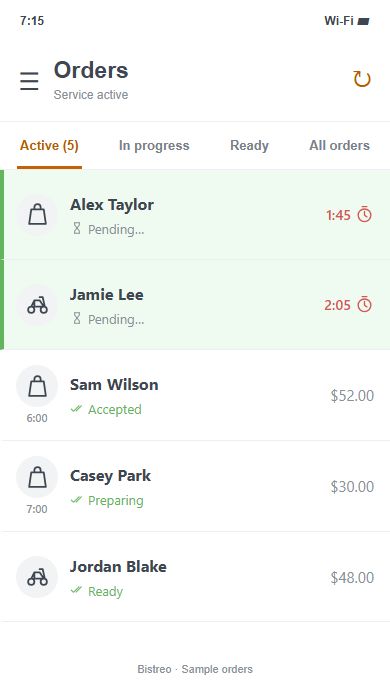
App order queue preview · sample orders
Changing an ordering provider affects your menu, staff, printers, payment setup and the links customers already use. Bistreo brings online ordering and kitchen order handling together, but you should test the features you rely on before making the change.
A restaurant website and ordering page for your own pickup and delivery orders.
Before switching: Review your menu, opening hours, services, delivery rules and enabled payment methods.
Accept or decline incoming orders, set ready times, pause service and manage stock.
Before switching: Install the direct-download APK and test notifications, background receiving and staff access.
Epson printing from the Android app after acceptance, with test receipts and reprints.
Before switching: Check the actual printer model, connection and paper size. Hardware compatibility is not automatic.
Store-controlled future ordering with a staff confirmation workflow.
Before switching: Confirm your pre-order policy and test the customer messages, requested times and emails.
Menus, services and staff access are configured for the selected store.
Before switching: Build and review each location instead of assuming another store’s configuration applies.
Record your menu, option groups, images, hours and ordering rules. Keep the records you need while you still have access to your existing account.
Configure your store, menu and staff. Test customer checkout, notifications, ready times and printing on the hardware you will use in service.
Update your website order buttons, business profiles, social links and QR codes at a planned cutover. Monitor new orders before retiring the old setup.
No. Bistreo is an independent service and is not affiliated with, endorsed by or a successor to GloriaFood or Oracle. Evaluate it against your restaurant’s requirements before switching.
There is currently no self-service one-click GloriaFood importer in Bistreo. You can build your menu using categories, items and reusable option groups. Allow time to configure and verify the menu before going live.
Do not assume they will. Automatic transfer of GloriaFood customer accounts, historical orders and saved payment methods is not included. Preserve the records you need separately and confirm any data-transfer requirements before moving.
Bistreo currently offers a free plan. Payment-provider and other third-party service charges are separate. Check the current plan details and your required services before making a decision; this is not a forever-free price guarantee.
The current Android APK supports Android 7.0 or newer. Epson kitchen printing requires a compatible model and interface. Test your actual hardware using the app download and printer setup guides before depending on it during service.
No platform switch can be promised to be interruption-free. Build and test the replacement first, prepare every ordering link and choose a controlled cutover. Keep track of pending orders in both systems during the transition.
Use the sample order demo, explore the app and make sure the setup suits your restaurant. No real order or payment is created by the demo.