
Food delivery ordering
Deliver on your terms. Keep the customer connection.
Take direct delivery orders with store-specific delivery zones, fees and minimums. Your restaurant fulfils the delivery; Bistreo takes 0% order commission.
0% Bistreo order commission. Payment-provider fees are separate.
01 / Food delivery ordering
Set the area you can serve
Configure active delivery zones for the selected store. Set boundaries, fees and minimum order amounts, then test addresses inside and outside each zone before going live.
02 / Food delivery ordering
The right details for the trip
Guests provide their delivery address and checkout comments. Staff review the delivery information and payment status when handling the order in the app.
03 / Food delivery ordering
Confirm every delivery order
Your kitchen accepts or declines each request. Enable scheduled delivery when appropriate and configure hours and preparation time for the service your team can provide.
Delivery setup guide →Inside Bistreo
Set it up in your dashboard
Use Selected store in the dashboard header to switch locations, then follow the steps below. Tap a screenshot to view it at full size.
- 1
Enable services for this location
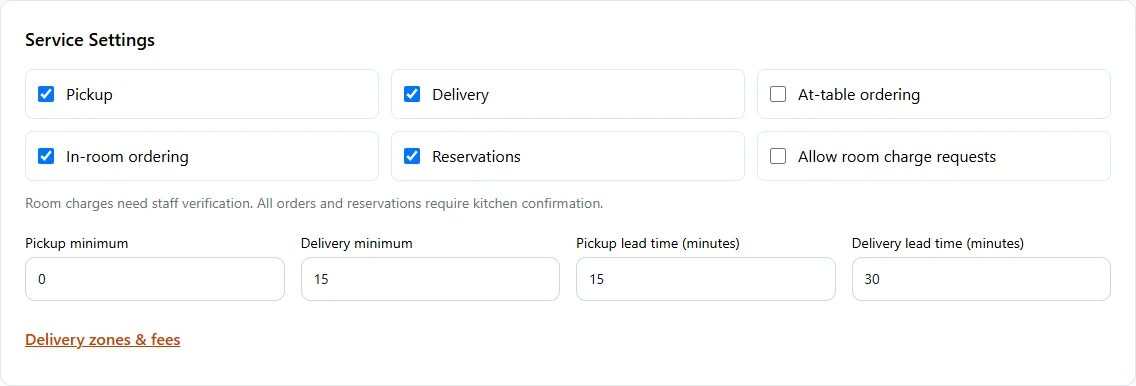
In Store Management, open Store & team → Services & opening hours. In Service Settings, enable Pickup, Delivery, At-table ordering, In-room ordering or Reservations. Set lead times and minimums, then Save services & opening hours.
- 2
Create a valid delivery zone
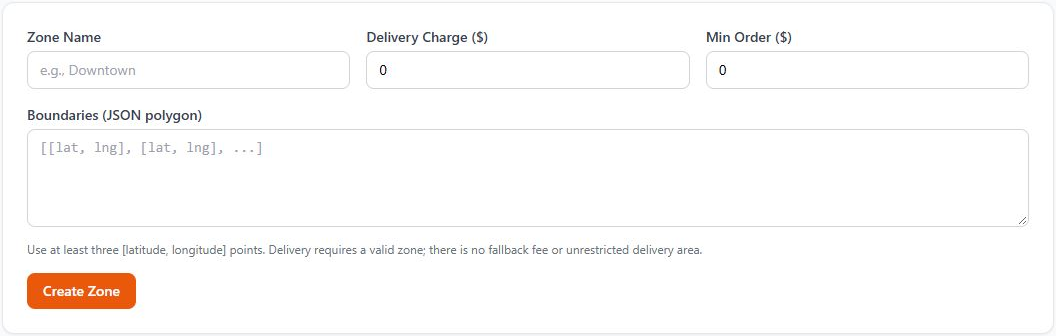
In Store Management, select your store, then open Store & team → Services & opening hours. Save any location changes, then open Delivery zones & fees. On that page, choose Add Zone. Enter Zone Name, Delivery Charge and Min Order. Boundaries uses a JSON polygon with at least three [latitude, longitude] points. Create Zone, then test addresses inside and outside the area; delivery requires a valid zone.
Make it yours
Your next order can come directly to you.
Start with one Free store. Add your menu, verify your settings and test the complete flow before opening for orders.
Get started with Bistreo